Find Every AI Tool on Every Endpoint - Known or Unknown
Five independent detection layers find AI coding tools by name, by network destination, and by behavior - so a tool is caught even when no signature exists for it.
Shadow AI Is the Default State
Developers adopt AI tools the way they adopt editors: individually, immediately, and without asking. A single engineering org routinely runs Claude Code, Cursor, Copilot, Windsurf, and a handful of local inference servers at the same time - none of it in an inventory, none of it in a risk register.
Signature-based inventory alone cannot close this. New AI tools ship weekly, and a fifteen-line Python script that calls an LLM API directly has no signature at all. Detection has to work by name, by destination, and by behavior simultaneously.
Five Independent Detection Layers
Each layer works on its own. Together they close the gap between the tools you approved and the tools that are actually running.
| Discovery | Filesystem scanning for config directories, VS Code and JetBrains extensions, and process names - 14 AI tools detected by name |
| Network | Connection monitoring identifies 25+ cloud LLM APIs and 7 local inference servers by destination |
| Behavioral | Behavioral heuristics recognize how AI tools act - catching unknown and custom tools no signature list has heard of |
| Telemetry | Deep session telemetry for Claude Code - full conversation replay, token tracking, MCP visibility |
| Dependency | Dependency monitoring across 9 package formats, with known vulnerabilities flagged automatically |
Detection depth varies by tool
Claude Code gets full session reconstruction: every prompt, response, tool call, file access, MCP connection, token count, cost, and subagent relationship. Other tools are detected by process, extension, and configuration directory - presence, version, and usage rather than conversation content.
Windows Subsystem for Linux is covered with full cross-boundary detection: Claude Code sessions running inside WSL are captured with the same depth as native sessions.
Fleet-Wide AI Inventory
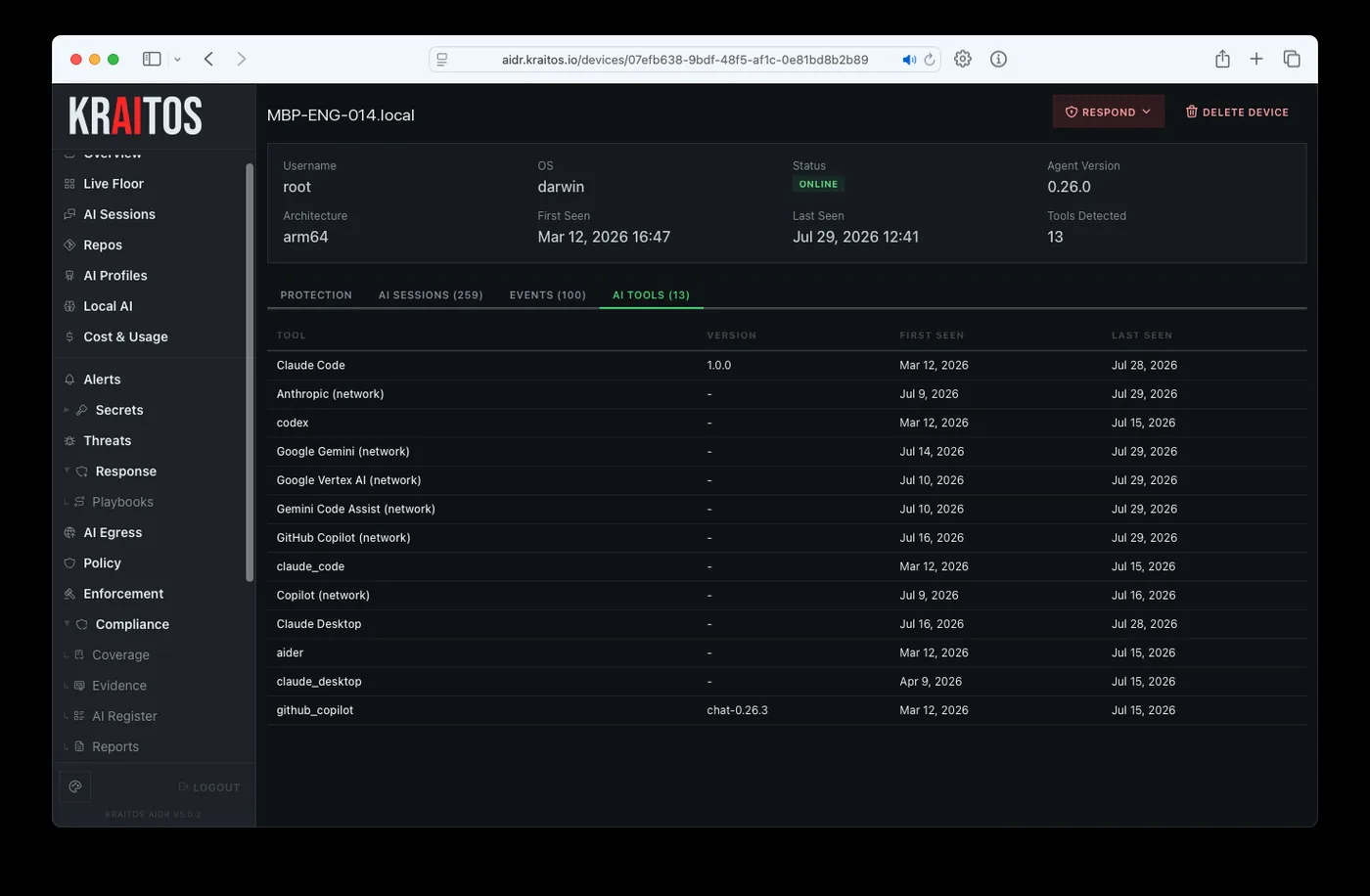
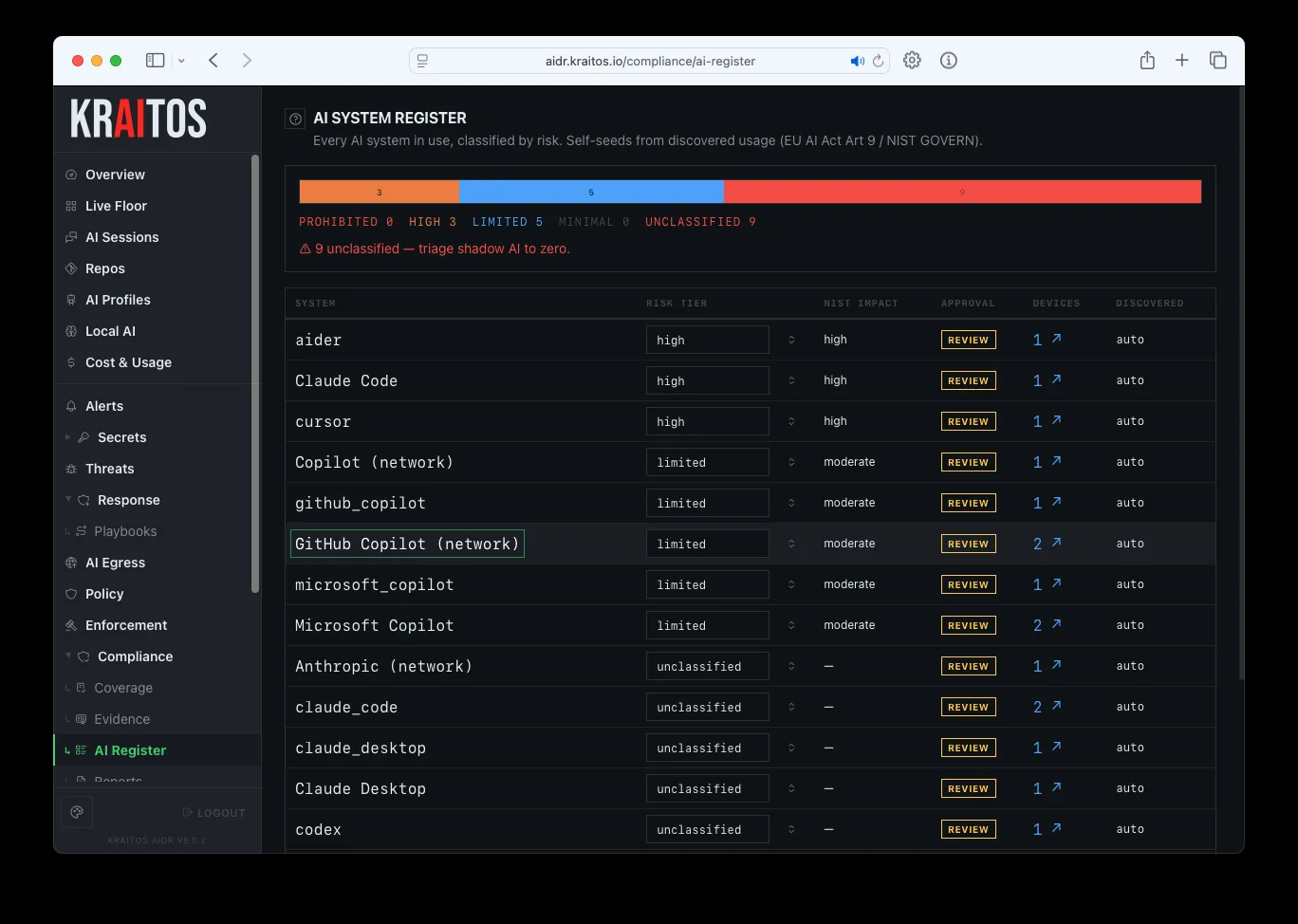
What Is Detected
Tools detected by name
| Tool | Detection depth |
|---|---|
| Claude Code | Full session reconstruction - prompts, responses, tool calls, file access, MCP connections, token counts, cost, subagent relationships |
| GitHub Copilot | Process detection, VS Code extension monitoring, usage tracking |
| Cursor | Process detection, configuration directory monitoring |
| Aider | Process detection, config file monitoring |
| Windsurf / Codeium | Process and VS Code extension detection |
| Continue | VS Code extension and configuration monitoring |
| Cline | VS Code extension detection |
| Amazon Q Developer | AWS configuration and process detection |
| Codex CLI (OpenAI) | Process detection |
| Sourcegraph Cody | VS Code extension detection |
| Supermaven, Tabnine, Tabby | Process and extension detection |
| OpenHands | Process and Docker detection |
Coverage
- Tools by name (14)
- Claude Code, GitHub Copilot, Cursor, Aider, Windsurf / Codeium, Cline, Continue, Sourcegraph Cody, Amazon Q Developer, OpenAI Codex CLI, Supermaven, Tabnine, Tabby, OpenHands
- Local inference servers (7)
- Ollama, LM Studio, Jan.ai, GPT4All, llama.cpp, text-generation-webui, vLLM
- Cloud LLM APIs (25+)
- OpenAI, Anthropic, Google Gemini, AWS Bedrock, Azure OpenAI, Groq, Mistral, Cohere, DeepSeek, Perplexity, Together, Fireworks, Replicate, HuggingFace, OpenRouter, xAI, and more
- Local model metadata
- Model name, size, quantization, and last-used time for self-hosted inference
- Dependency formats
- 9 package formats with automatic known-vulnerability checks
- WSL
- Full cross-boundary detection
Controls This Evidences
- NIST CM-8
- System component inventory - AI tools included in the asset inventory
- ISO A.5.9
- Inventory of information and other associated assets
- SOC 2 CC6.1
- Logical access controls - which AI tools are permitted where
- EU AI Act
- AI Register auto-population from fleet discovery, with review queue
See Kraitos AIDR in Action
Deploy in 60 seconds. Get answers in 24 hours. Stop guessing what your AI-augmented organization is doing.
[email protected]kraitos.io